.png&w=3840&q=75)
.png&w=3840&q=75)
The Writer's Complete
Guide to NotebookLM
Most of the writing community is barely scratching its surface. Here's how to use the most powerful AI research tool available — without losing your own voice.
Open NotebookLM ↗It's not a writing tool.
That's the point.
The single most important thing to understand about NotebookLM is what it refuses to do: it will not generate content from its general training data. Ask it to "write me a short story about dragons" and it will decline. Ask it to "identify every scene where my dragon character appears and summarize their emotional arc across all three acts," and it will deliver a cited, passage-linked response in seconds.
NotebookLM generates responses grounded exclusively in documents you upload, with inline citations pointing to exact passages in your sources. This architecture dramatically reduces the likelihood of the AI inventing details about your work that don't exist. For writers managing sprawling research, multi-book series, or complex narratives, this transforms NotebookLM into something no other AI tool currently offers — a continuity editor, research librarian, and first-pass beta reader that never sleeps, never forgets, and always cites its work.
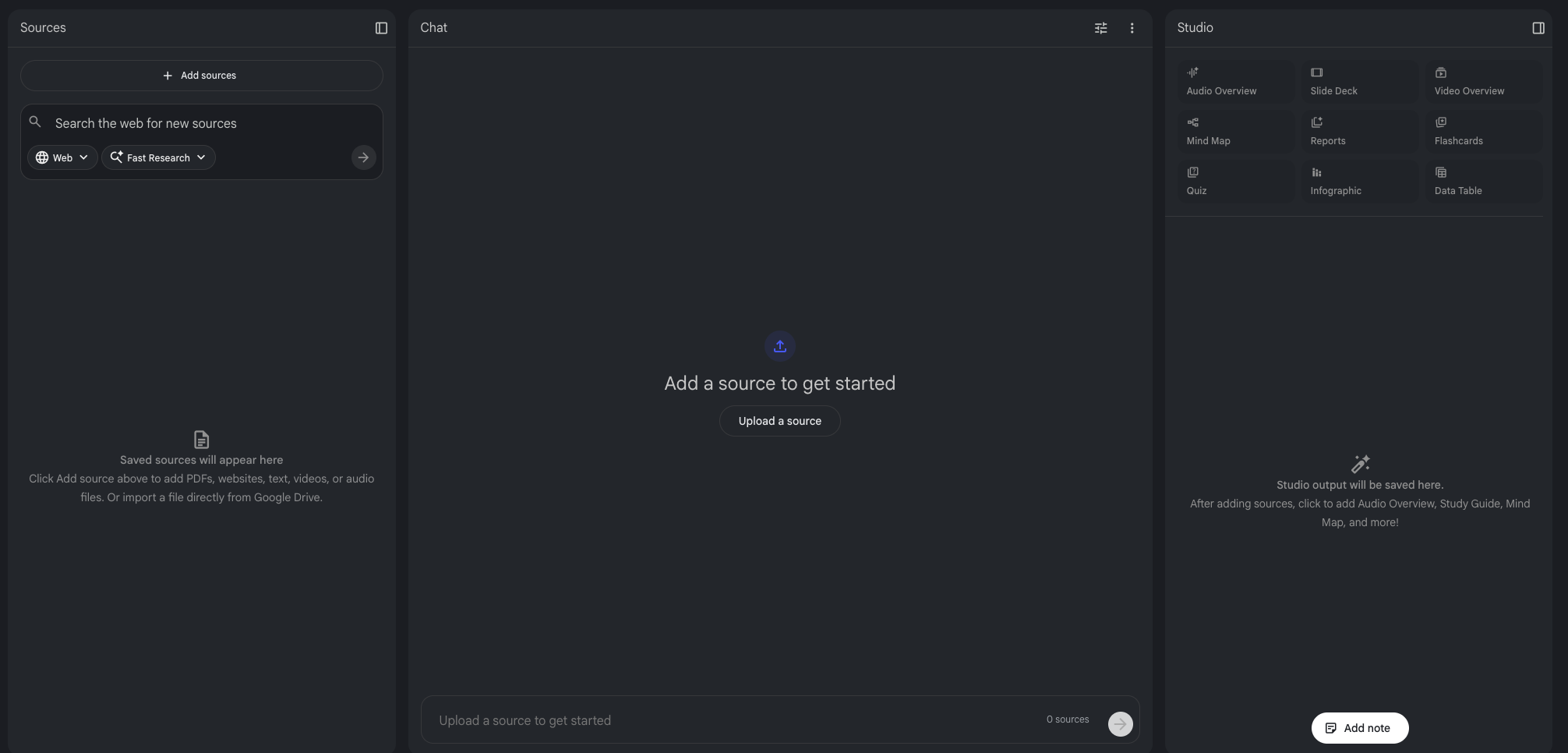
The three-panel interface: a Sources Panel (left) for managing uploaded documents, a Chat Panel (center) for conversational queries with inline citations, and a Studio Panel (right) for one-click generation of audio podcasts, video overviews, mind maps, reports, flashcards, quizzes, slide decks, infographics, and data tables.
Each notebook holds up to 50 sources on the free tier (each up to 500,000 words). The December 2025 Gemini 3 upgrade brought significant improvements in reasoning about complex narrative structures. The February 2026 update expanded conversation memory by 6×, enabled saved chat history, and introduced custom goals — persona prompts up to 10,000 characters — so you can instruct the AI to act as a "developmental editor," "harsh critic," or "genre-specific beta reader."
What does it cost?
Per Google's current pricing page:
| Tier | Price | Notebooks | Sources / notebook | Daily queries | Audio Overviews / day |
|---|---|---|---|---|---|
| Free | $0 | 100 | 50 | 50 | 3 |
| Pro (Google AI Pro) | $19.99/mo | 500 | 300 | 500 | 20 |
| Ultra | $249.99/mo | Enterprise-scale; most individual writers won't need it | |||
The free tier is more than sufficient for most individual writers. Pro bundles Gemini Advanced and 2TB Google storage — worth considering if you're managing multiple large projects simultaneously.
Build your writer's workspace before you start querying
How you organize your notebooks determines how useful the tool becomes. Experienced writers converge on a consistent structure: one notebook per major project, plus specialized reference notebooks that serve across projects.
For a fiction writer working on a trilogy: a dedicated notebook per book (manuscript draft, character profiles, chapter outlines, book-specific research), a separate "Series Bible" notebook for world-building and cross-book timelines, and a "Craft & Technique" notebook with writing guides and genre conventions. Steven Johnson, NotebookLM's co-creator and author of 14 books, also advocates an "everything notebook" — a loosely curated collection of quotes, brainstorming fragments, and reference material for serendipitous connection-making.
Only ~20 characters of each source name display in the sidebar — name files clearly. Combine multiple short research articles into single PDFs to conserve source slots. Upload finalized, clean documents whenever possible. Non-linear narratives with flashbacks can confuse NotebookLM — create a separate chronological version of your manuscript to upload alongside the original.
What file types can you upload?
Notable gaps: ePub files, paywalled web content, and copy-protected PDFs are not currently supported. Web URLs extract text only — images and embedded media within pages are ignored.
From worldbuilding to simulated beta readers
Fiction writers have discovered the deepest, most creative applications of NotebookLM. Their real-world experiences reveal capabilities that go far beyond what Google markets.
The continuity editor that never forgets
Fantasy author Robb Wallace, writing his epic series "The Silence In The Song," uploaded his 150,000-word first novel, 85,000-word work-in-progress, and approximately 25,000 words of notes into a single notebook. NotebookLM identified two aspects of an initial prophecy established in book one that Wallace had "veered away from" in book two — gaps at 85,000 words deep that would normally surface only with beta readers or a developmental editor.
"I would have found these gaps eventually, but hopefully this way it will be far stronger by the time it gets to them."— Robb Wallace, fantasy author, on finding continuity gaps with NotebookLM
YA fantasy novelist Matt Kelland maintains separate notebooks for three novels in progress. For his Welsh-set fantasy Yellow Flowers, he uploaded three different drafts alongside Welsh place name databases, 13th-century castle construction references, narrative style guides, and YA fantasy trope lists. He queries with prompts like:
"Suggest some names for rivers that sound Welsh and evoke a feeling of grandeur — tell me their meaning, and indicate if these names are from real places or from a fictional source."
For plot hole detection, Kelland uses targeted prompts:
"Which bits of Part 1 feel rushed?"
"Does the relationship between X and Y develop in a believable way?"
Uploading a previous draft outline alongside a revised one and asking NotebookLM to compare them reveals exactly which scenes were moved, removed, or added — a revision roadmap that previously required manual side-by-side comparison.
Simulating beta readers before your beta readers
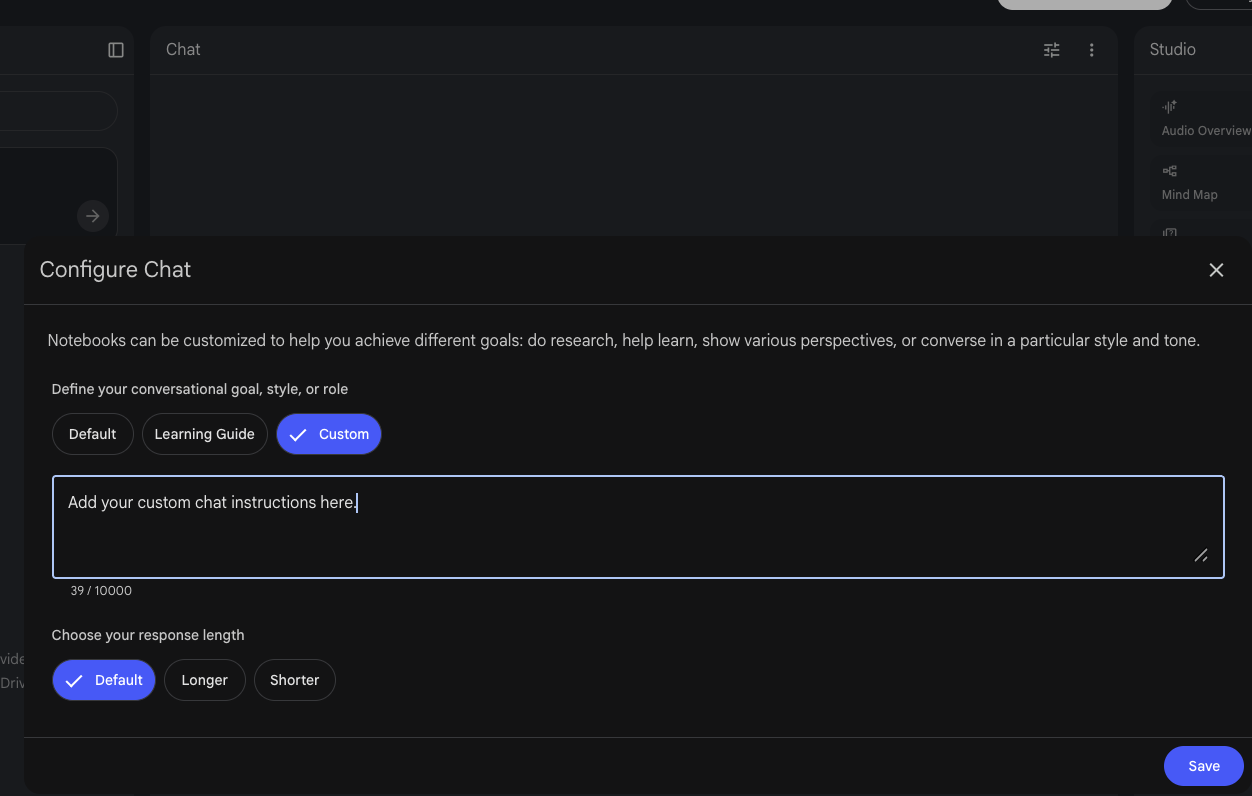
The expanded 10,000-character custom goals feature lets you instruct the AI to adopt specific critical perspectives. Wallace asks NotebookLM to analyze "from the perspective of a fantasy author's critic," then separately as "a harsh book reviewer," then as "a developmental editor" — receiving substantively different feedback each time.
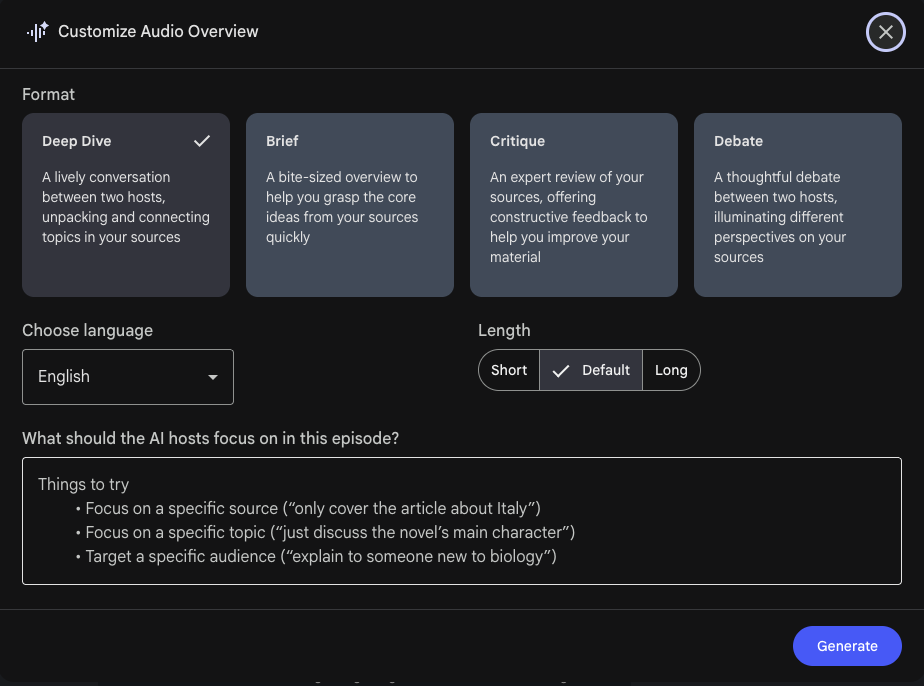
The Audio Overview feature takes this further. Wallace generated a podcast-style discussion where two AI hosts debated his novel's strengths and weaknesses, calling it "very refreshing and a great way to make improvements." The Critique format (added September 2025) is specifically designed for constructive evaluation, while the Debate format stages formal back-and-forth arguments.
NotebookLM exhibits a consistent positive bias when evaluating creative writing. Writers on Royal Road forums reported that self-described "daft stories about superheroes" were praised for "satirical commentary on power dynamics and morality." Kelland emphasizes this is "not a substitute for having actual beta readers or a critical writers' group, but it is a useful first cut." Explicitly instructing the AI to be harsh or to focus on weaknesses helps counteract this tendency.
Character tracking across sprawling narratives
Comic adaptation writer Dennis Francis built a complete character database in Google Sheets — personality traits, motivations, reactions to key events, relationships, power dynamics, and thematic function — and uploaded it as a NotebookLM source (Google Sheets support added November 2025). When he pastes drafted scenes back into the notebook, he asks whether they maintain consistency with established character arcs, thematic frameworks, and historical accuracy.
"Pull out every reference to [character name] throughout the entire manuscript."
This produces a comprehensive character audit — every appearance, every dialogue line, every description — with citations linking back to exact locations. This alone can save hours of manual searching during revision.
Screenwriters, journalists, and nonfiction authors each get distinct advantages
Screenwriters
Instant chronology breakdowns, continuity queries by character/scene, and "Previously On" recap generation from uploaded scripts.
Journalists
Synthesize document dumps while maintaining citation integrity. Mind Maps visualize entity connections in complex investigations.
Nonfiction Authors
Transform scattered sources into structured understanding. Cluster themes, surface contradictions, and track citations during drafting.
Screenwriters: script analysis that used to take weeks
Professional film editor Shane Woods, who worked on Apple TV+'s Constellation, documented how NotebookLM transformed his script analysis workflow. For projects with complex jumping timelines, the tool provides instant chronology breakdowns and answers precise continuity queries:
"Where is Tommy when Polly is first talking to Reuben?"
Scene-by-scene breakdowns, character appearance spreadsheets, and key data extraction — work that previously required weeks — now generate in seconds.
Journalists: from document dumps to sourced stories
Upload court filings, archived interviews, official documents, and audio recordings for an investigation, then ask targeted questions and receive citation-backed responses. The Mind Map feature helps visualize connections between entities. Journalist Clare Spencer (Generative AI in the Newsroom) found the tool particularly effective for retrieving exact quotes when there's a dispute over what was said. The Deep Research feature (launched November 2025) acts as an autonomous research agent — creating a research plan, browsing hundreds of websites, and generating organized reports.
Nonfiction authors: research synthesis at scale
Upload all research papers, interview transcripts, and articles, then ask the AI to cluster sources into themes, identify recurring arguments, or surface contradictions. Every claim links back to specific source passages, making citation tracking during drafting significantly faster. Dennis Francis documented measurable productivity gains across his workflow: research phases dropped from 12–15 hours to 6–8 hours, scene scripting fell from 2–3 hours to 45–60 minutes per scene, and revision cycles decreased from 4–5 passes to 2–3 passes.
Audio overviews, mind maps, and outputs most tutorials overlook
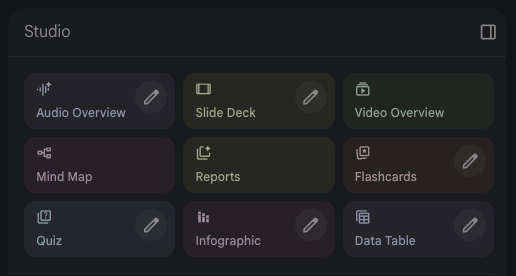
Audio Overviews — the standout feature for writers
Per Google's Audio Overview documentation, four formats are available: Deep Dive (two hosts, 8–10 minutes), Brief (single speaker, under 2 minutes), Critique (two hosts, constructive evaluation — added September 2025), and Debate (formal back-and-forth). All support 80+ languages. The Interactive Mode lets you join the conversation by voice. For writers, generating an Audio Overview of your draft chapter and listening during a commute reveals structural and tonal issues that reading on screen can miss.
Mind Maps — for worldbuilders especially
Mind Maps provide one-click visual representations of how topics, characters, settings, and themes connect across your sources. One historical fiction writer uploaded plans for three Viking-era novels; the Mind Map automatically organized everything hierarchically — individual book outlines branching to chapter summaries, connecting to character arcs, linking to historical context.
Other Studio outputs worth knowing
Video Overviews (launched August 2025) create narrated visual presentations — useful for pitch materials or visual story bibles. Data Tables (December 2025) extract structured information from unstructured documents into comparison tables exportable to Google Sheets. Reports auto-generate in formats including Study Guides, Briefing Documents, FAQs, Timelines, and Blog Posts — the Timeline format is particularly useful for writers managing complex chronologies.
The prompts that published authors actually use
Vague queries produce generic responses. Hyper-specific prompts unlock genuinely useful analysis.
Finding unexpected connections (via Joel Kelly)
"Please synthesize the connection, however abstract, between these topics: {TOPIC A} and {TOPIC B}. Ground all main points in specific quotes from the sources."
Gap analysis during revision
"Review all the uploaded documents together and identify what is missing — not what is already covered."
This surfaces dropped plot threads, unresolved questions, and missing connective tissue.
Contradiction detection across drafts
"Review all uploaded documents and find all contradicting information, making both sides of the coin clear."
The 360-Degree Feedback Report
"Create a '360-Degree Feedback Report' for this manuscript. Present the report in separate sections:
(1) The Strict Editor's View — point out the 3 weakest passages;
(2) The Reader's View — what's confusing or loses engagement;
(3) The Genre Expert's View — how well does this meet genre expectations?"
Use source checkboxes strategically. Before querying, select only the specific sources relevant to your question. Asking about character consistency? Select only your manuscript and character profiles, deselecting research materials. Also: save important responses as Notes immediately — Notes persist across sessions and can later be converted into sources themselves.
What writers must know before relying on this tool
NotebookLM's source-grounded design substantially reduces hallucination compared to general-purpose AI tools, but does not eliminate fabrication entirely. Per research on LLM overconfidence in document-based queries, errors tend toward "interpretive overconfidence" — the AI editorializes beyond what sources support or generates plausible but unsupported characterizations. Writers on Royal Road forums report specific fabrications: one user's logging-camp story prompted the AI to invent "giant sentient woodlice" as a plot explanation, while another found the AI insisting characters were romantically involved with zero textual evidence.
Official tutorials & community resources
The fastest way to level up is to go straight to the source. Here are Google's own guides plus the best writer-specific breakdowns:
NotebookLM — Start Here
The main interface. Free to use with a Google account.
8 Expert Tips for Getting Started
Google's own beginner guide covering key workflows.
6 Ways to Use NotebookLM to Master Any Subject
Covers Audio Overviews, mind maps, and chat strategies in depth.
NotebookLM Help Center
Official documentation for all features, limits, and FAQs.
Custom Personas & the Chat Engine
Essential reading for setting up critical personas as a writer.
Deep Research + New Source Types
Covers the autonomous research agent and new file type support added in late 2025.
NotebookLM for Writers
A working novelist's deep-dive into practical fiction workflows.
Google NotebookLM for Authors
Continuity checking and beta reader simulation in practice.
Interrogating the Script: Practical Use Cases
A professional film editor's guide to script analysis workflows.
"Obsidian is where I think out loud. NotebookLM is where I verify I'm thinking straight."— Dennis Francis, comic adaptation writer
NotebookLM is not an AI that writes for you. It's an AI that helps you understand what you've already written — and what you still need to write next.